How NDIS Providers Are Using Voice-to-Text AI to Cut Progress Note Admin in Half
If you run an NDIS provider organisation, your frontline support workers likely spend hours every week manually typing shift notes. With 2 in 3 NDIS providers currently running at an operating loss, this heavy administrative burden directly erodes operating margins and accelerates worker burnout. Experienced professionals often bill for only a fraction of their workday because the rest is swallowed by record-keeping, report writing, and manual administrative updates.
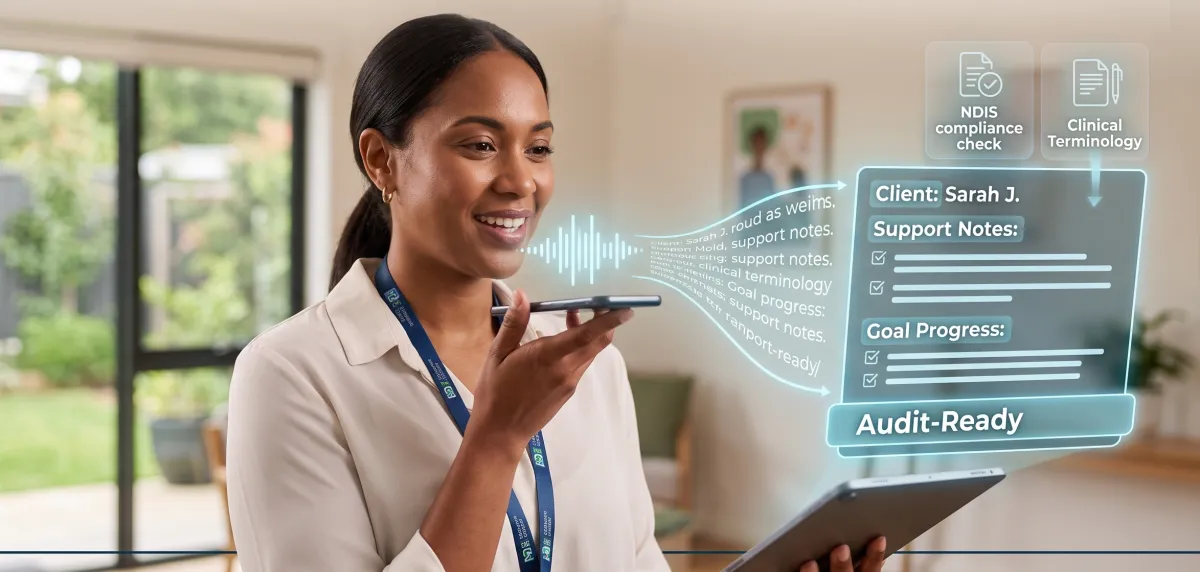
Voice-to-Text Progress Notes use speech recognition and generative AI to convert spoken dictation into structured, audit-ready NDIS progress reports. Instead of sitting in a car typing notes on a phone screen or logging into a laptop late at night, a support worker simply speaks into their smartphone for 60 seconds at the end of a shift. The AI transcribes the audio, strips out informal speech, converts casual phrases into objective clinical terminology, and structures the text to match NDIS Quality and Safeguards Commission standards.
How It Works
An automated voice-to-text progress note system relies on a streamlined four-stage workflow:
Voice Capture: Immediately following a support session, your worker opens a secure mobile interface and dictates a summary of the shift in standard, conversational speech. They cover key activities, participant goals, mood, and any notable events or incidents.
AI Processing & Formatting: The raw audio is transcribed and passed through a custom AI prompt tuned to NDIS compliance standards. The system removes filler words ("um", "ah"), corrects grammatical errors, strips out subjective judgments, and formats the narrative into standardised categories (e.g., Support Delivered, Goal Progress, Participant Choice & Control, Incidents/Risks).
Human-in-the-Loop Verification: Within seconds, the formatted progress note appears on the worker’s screen. The worker reviews the text, edits any details if necessary, and taps "Approve".
CRM & Portal Integration: Once verified, the approved note automatically posts directly into the participant’s profile in your Client Management System (CMS) or database, timestamped and linked to the funding allocation.
Software & Tech Stack Options: Buy vs. Build
When implementing voice-to-text progress notes across your team, you generally have two technology paths to choose from:
Option A: Off-the-Shelf SaaS Platforms (Subscribe)
If you want a turn-key solution with zero custom engineering, you can subscribe to specialised software with built-in voice-to-text logging:
Integrated Care & Practice Management Platforms: Systems like Splose, ShiftCare, or KoalaOne offer built-in AI voice dictation tied directly to shift check-outs, rostering, and billing.
Dedicated AI Clinical Documentation Tools: Software like AccuNote, RecovrFlow, or Medinex functions as a dedicated documentation layer that converts voice audio into audit-ready NDIS notes.
Pros: Rapid setup, built-in Australian data sovereignty compliance, and immediate usability.
Cons: Per-seat monthly subscription costs and less flexibility to customise notes beyond standard templates.
Option B: Custom Automation Pipeline (Build In-House)
If you already use an enterprise CRM or database (like Lumary, AlayaCare, or HubSpot) and want full control over your data flow, you can construct a custom pipeline:
Voice Transcription: An API engine like OpenAI’s Whisper API or Deepgram to convert raw voice recordings into text.
AI Processing: OpenAI GPT-4o or Anthropic Claude API configured with strict zero-data-retention and privacy agreements to format text into your agency's exact templates.
Middleware & Capture: An automation connector like Make.com or Zapier that accepts audio files from a secure web form (e.g., Jotform) and pushes the structured text directly into your core database.
Pros: Complete ownership of note structure, no recurring per-seat fees from third-party tools, and direct integration into existing systems.
Cons: Requires technical integration, API setup, and ongoing oversight to maintain security and webhooks.
Steps You Can Take to Set It Up
To deploy an automated voice-to-text progress note engine for your organisation, follow these five steps:
Step 1: Define Your Standardised Note Template
Select a consistent framework for all frontline staff. A standard NDIS-compliant structure includes:
Context: Date, duration, support line item.
Goal Alignment: How the shift directly supported the participant’s NDIS plan goals.
Observations: Objective, non-judgmental recording of behavior, mood, and achievements.
Incidents/Actions: Operational follow-ups, medication notes, or escalation triggers.
Step 2: Establish Your Secure Tech Infrastructure
Select an enterprise SaaS application or build a pipeline using zero-data-retention APIs linked securely into your client database.
Step 3: Engineer Your AI Instructions (Prompting)
Program the AI system with explicit NDIS reporting guidelines:
Instruct it to convert subjective statements ("Participant was uncooperative") into objective statements ("Participant expressed a preference not to leave the house today and chose an indoor cooking activity instead").
Instruct it to flag any mention of restrictive practices, injuries, or critical incidents for immediate supervisor notification.
Step 4: Run a 14-Day Pilot Trial
Select 2 to 3 experienced support workers to test the system in the field. Evaluate dictation accuracy in real-world environments (e.g., in cars or outdoor supports), measure time saved per shift, and fine-tune your template settings.
Step 5: Implement Standard Operating Protocols (SOPs)
Train your staff on a strict "Verify Before Submit" policy. The AI serves as an administrative assistant, but human oversight remains legally necessary to confirm accuracy before notes enter participant records.
Risks and Considerations
While voice-to-text notes offer significant time savings, you must manage specific compliance and operational risks:
Hallucinations & Transcribing Errors: Voice recognition tools can mishear complex medical terms, participant names, or numbers. Without mandatory human verification, inaccurate records could end up in official participant files.
Clinical Objectivity: Audits require factual observations, not opinions. AI prompts must be strictly guarded against inserting subjective interpretations or overly emotional language into progress notes.
Staff Adoption: Frontline workers accustomed to writing brief, one-sentence shift notes may need clear guidance on how to speak descriptive summaries into the microphone to give the AI enough raw detail to work with.
Ready to Modernise Your NDIS Operations?
Book a Free 30-Minute Discovery Call
On this call, we will:
Review your current administrative workflows and locate where you are losing time and billable hours.
Map out an automated intake pipeline tailored to your agency.
Show you how to implement safe, compliant AI technology without complex technical setups.